
Welcome! This is a post that covers in great detail the differences between Windows Azure Web Sites (App Service: Web Apps as they are now called - this article will just refer to them by their original name) and Windows Azure Web Roles (azurewebsites.net vs cloudapp.net). It was first written a couple of days after Web Sites was first released, but I have been keeping it up to date as changes to Web Sites are announced. There is a change log of updates at the bottom of the post and I have struck out content that becomes out of date over time. There is also a good official Microsoft post that gives a similar comparison, but not quite as comprehensive that you can also refer to.
Shameless Plug: If you are interested in using the power of Azure Web Roles with the nice deployment experience of Azure Web Sites then check out the AzureWebFarm and AzureWebFarm.OctopusDeploy libraries I work on.
Diagrammatic Overview
The Windows Azure Training Kit has a slide with a really nice overview of the three options for deploying web applications in Windows Azure (note: Virtual Machines are outside the scope of this post):

Options for deploying websites in Azure and comparison to on-premise hosting.
tl;dr
Azure Web Sites has the following advantages:
- Out of the box support for ASP.NET, python, PHP, node.js and classic ASP
- Out of the box support for near-instant Git, VSO, FTP, Web Deploy and Dropbox deployments
- Out of the box support for configuring a VSO build that can compile code and run tests as part of the deployment
- Instant roll-backs (when using Git or VSO deployments)
- Free, out-of-the-box valid HTTPS when using default azurewebsites.net domain
- Out-of-the-box manual and automated backup and restore
- Much faster site provisioning and scaling (often takes seconds)
- Simpler Visual Studio solution (no need for extra Cloud project)
- One-click install of common open-source blog and CMS platforms
- Friendlier, comprehensive in-built (read: one-click to activate) monitoring and diagnostics
- Automatic configuration modification and config transforms on deploy
- Multiple websites (deployed separately) on a single farm out of the box
- Memory dumps via a REST API
- Out-of-the-box support for remote debugging from Visual Studio
- Ability to have staging environment with custom domain name and ability to change configuration settings at the same time
- Always On Support to keep your application pool warmed up and (optionally) auto-heal any problems in your app pool
- Multiple programming language support for periodic and continuous background jobs
- Ability to view processes running the machine and their CPU and memory use from the Azure Portal and remotely kill rogue processes
- Ability to add pre-packaged extensibility via Site Extensions
- Ability to connect to on-premise resources securely without needing VPN via Hybrid connections
- In-built A/B testing / canary deployment ability using Testing in Production (TiP) / Traffic Routing feature
Azure Web Roles has the following advantages:
- Use non-standard HTTP and/or TCP ports
- Remote desktop into the VMs
- Faster Windows Azure Virtual Network connection
- Run arbitrary startup scripts with or without elevated privileges
- Use Azure Drive to mount NTFS volumes from blob storage
- More control over what diagnostic information you would like to collect
- Full control to configure IIS
- Perform complex autoscaling
- Scale to hundreds of VM instances (max in Web Sites is currently 10)
- Use Extra Small (low cost) and A4 (Extra Large) / A5 / A6 / A7 / A8 / A9 (intense workloads), D-series and G-series VM sizes
- Install SSL for unlimited custom domain names for free
- Resolve arbitrary domain names to your site without specifying them in the portal
- Configure affinity groups and make use of upgrade and fault domains
- Use the CDN against your web site content
- In-role cache nodes
- 99.95% SLA as opposed to a 99.9% SLA
- You get more than 50GB of disk space
- Ability to use GDI+, Report Viewer and DNS lookups in your code
- Ability to make calls to localhost
- Access to performance counters
Sometimes Virtual Machines are a valid choice - check out my whitepaper on deploying web applications in Azure for more information.
Conclusion
If you need enormous scale, a non-standard/complex configuration (e.g. full IIS customisation, non-standard ports, complex diagnostics or start up scripts / custom software installs), more than 50GB of disk space or RDP then you need Web Roles.
In most other scenarios Web Sites is the best choice since it’s the simplest option and is fully-managed. The Web Sites platform is being constantly innovated on with new features surfacing almost every month – Microsoft are investing a lot of resources into making sure it’s a state of the art platform. If your application grows in complexity over time and needs to migrate from Web Sites to Web Roles or Web Roles to Virtual Machines this is a relatively easy process so you should be able to start with the simplest option initially (Web Sites) with confidence you can change later if required.
Web Sites
Long-story short: Convention-over-configuration IIS-as-a-service to get you up and running quickly in Azure with a minimum of fuss (kind of like App Harbor). Also, it allows you to use a certain amount of Azure resources for free (10 websites on shared instances with limited bandwidth), which is a welcome addition and will be great for proof of concepts or just playing around with stuff!
The advantages that Web Sites seems to have over Web Roles are:
- Out of the box support for Git (including hosted within Azure, CodePlex, Github and Bitbucket), VSO, FTP and Web Deploy and Dropbox deployments, which makes automated deployments and continuous delivery dead easy (not that it’s terribly difficult using PowerShell for Web Roles), and importantly, quick.
- Annoyingly (unless I’ve missed something), the git publishing doesn’t use private keys so you have to keep typing in the password, although from watching David Ebbo’s Youtube video on publishing from Git there must be some way to make it remember the password (I wouldn’t know as I always use private keys). [See update at end of post for instructions]
- It would be cool if some of these features were added to Web Roles and Worker Roles
; I’m not sure if this tweet from David Ebbo is any indication that might happen! It seems thatMicrosoft have open sourced their Git-IIS deployment library, Kudu, which is cool :)- I tried to deploy a solution that had multiple web projects, but no matter what I did it kept deploying the first web project that I had deployed. I’m not sure what conventions it uses, but if you need to configure which project is deployed then I imagine you can consult the relevant Kudu documentation (edit: looks like there are some ways to address it).
- If you use the Git publishing model
(and I assume the TFS publishing model)then you don’t have to commit your NuGet package binaries as they will automatically get resolved when you push (you do have to turn on Package Restore on the solution in Visual Studio for it to do it though- edit: package restore is being deprecated). This is great because it makes your deployment much faster. It does mean that if you use packages that aren’t in the official NuGet repository (e.g. in a private repository, or using a package service) then you will need to include those ones or update the nuget config- I haven’t tried seeing what happens when you do that though yet, so try with caution.
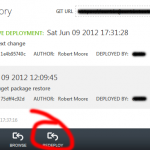
- Gives you the ability to roll-back to previous deployments instantly via the management portal if you are using Git
(and I assume TFS)deployments.
- You can deploy almost instantly out of the box (with the above mentioned deployment methods), rather than in 8-12 minutes or having to set up something like
Accelerator for Web RolesAzure Web Farm or AzureWebFarm.OctopusDeploy. - You can provision a new Web Site much faster than a Web Role (seconds rather than 8+ minutes); I’m guessing Microsoft will always have spare capacity spun up and ready at any point in time - their capacity management software must be fascinating!
- For .NET web apps: You don’t have to set up a separate project in your Visual Studio solution to deploy to Azure - you can simply deploy a normal web app solution as-is.
- This also means you don’t have to maintain two sets of configurations and set up a storage account for diagnostics so you can be up and running much quicker.
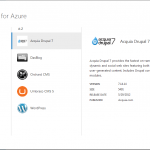
- Out of the box support for installing ready-to-go, open source web applications (from a list of common ones; mainly CMS’s and blogs).
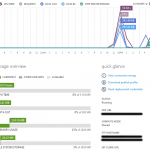
Built-in monitoring from the management portal(Web Roles has CPU and (optionally) memory as well now, but this also includes HTTP errors, requests and data)Web Sites has out of the box support for per-minute diagnostics now, which you can get the data for with Web Roles, but it’s all in-built into the portal for Web Sites and easier to use / consume:
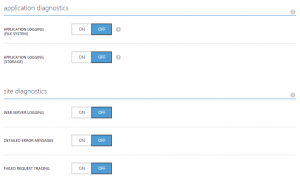
- Extra diagnostics options at the click of a button:
- Ability to inject configuration variables to your web.config file rather than having to package the final version with the deployment.
- This means you don’t have to use encrypted web.config files if you want to keep production configuration information in source control so you can do automated deployments, but still prevent developers from accessing the production environment.
- It does mean you potentially need to be more careful about who you give access to the management portal for your instances because the connection strings will
appear in plain textbe accessible to them.
- If you have a web.release.config file then the XDT transformations in this file will automatically be applied before deploying your site.
- You can add multiple host names that your site responds to (if it’s using
reserved instancesstandard or shared tier, but not forsharedfree tier).- It appears you have to do this if you want to point a CName record at the site - given there are multiple sites being hosted on the same IIS instances this makes sense.
- Given Web Roles allow you to point as many domain names as you want at it and it will resolve for all of them (assuming you are trying to resolve the main web site that is deployed in the Azure package rather than using a solution like
Accelerator for Web RolesAzure Web Farm, which does require you to specify the host name) this isn’t really an advantage that Web Sites has over Web Roles. - What it does mean though is that you can host multiple sites on a single set of reserved serversout of the box (which is why Web Sites deprecated Accelerator for Web Roles in combination with near-instant deployments).
- There is an implication if you are using
sharedfree tier rather thanreservedstandard or shared tiers that you can’t point custom domain names to your web site and thus have to use the azurewebsites.net domain name (which is probably fine if you are doing a prototype or proof of concept). It seems that for a given subscription in a given region you can have either free/shared or reserved Web Sites and thus any web sites that you add for a given subscription / region that has reserved Web Sites will be shared on your reserved servers.I can’t confirm this explicitly, but it’s the only thing that makes sense to me after seeing the management portal and reading between the lines in the documentation.
I would suggest that it will be important to keep this in mind if you want to segregate the servers that certain combinations of web sites that you deploy. You might want to do this due to their load profiles conflicting with each other. This is important unless Microsoft provides an easy way in the future to segregate your reserved instances within a single subscription or provide an easy way to migrate a site to a different subscription or region (unless I am missing something!).
- You can use MySQL (edit: You can use this with Web Roles easily too now by adding a MySQL database using Add-ons).
- You only need one instance to get the SLA rather than 2 instances in Web Roles
- It supports multiple programming languages out of the box
- It takes seconds rather than minutes to scale up and out as well as changing tier.
- You can host your “naked” domain name (i.e. without www.) in a supported way rather than having to resort to external services, clever programmatic solutions or being careful not to nuke your deployment.
- You can get memory dumps via a REST API via Kudu
- You can perform remote debugging from Visual Studio
- You can keep your application pool constantly warmed up with Always On Support
- As part of the Always On support you can define triggers that result in your app pool recycling automatically to auto-heal any problems in your website
- You can run periodic or continuous background jobs in multiple languages out of the box and you can deploy them as part of deploying your web application
- You can use a staging environment and immediately switch the files to production, while changing connection strings etc. plus you can assign a custom DNS name to your staging environment rather than the random
.cloudapp.net domain name for the Web Role staging slot (see the below comment from joshka though) - You get free, valid HTTPS out-of-the-box with the azurewebsites.net domain
- You get out-of-the-box support for manual and automated backup and restore
- Ability to view processes running the machine and their CPU and memory use from the Azure Portal and remotely kill rogue processes
- Ability to add pre-packaged extensibility to your web site at the click of a button via Site Extensions
- You can connect to on-premise resources securely without needing a VPN using Hybrid Connections
- There is an in-built function that allows you to perform A/B testing and canary deployments called Testing in Production (TiP) / Traffic Routing


Web Roles
With all that in mind, this is what I see as the advantages of / situations you would use Web Roles (a lot of those also apply to Virtual Machines, but that is outside the scope of this post):
- If you need to create an application that has non standard HTTP ports open (or frankly ports open for non-HTTP traffic) you can’t use Web Sites.
- You can’t RDP into the server for debugging or other purposes when using Web Sites.
If you want surety about network / virtual machine isolation of your application for security reasons you may not want to use (at the very least free/shared) Web Sites. This is a bit of conjecture though because without knowing the internals of how Web Sites is implemented it’s hard to say what kind of isolation it provides.(edit: VM isolation will be the same for standard tier, see next point about network isolation)You can use Windows Azure Virtual Networks to get network isolation of your Web Roles, but this can’t be used with Web Sites(edit: you can connect an Azure Web Site to a Virtual Network using a Point-To-Site VPN connection, which is limited to 100 Mbps, whereas Web Roles can be directly connected to the network)If you want to deploy a worker role to perform background processing alongside your web site via a worker role then you can do it using the same instance with a Web Role (thus costing less money; also, Azure Web Farm has the ability to support execution of console applications packaged with your web application providing the same kind of benefit).(edit: Web Sites now supports Web Jobs so this point is no longer relevant)- You can run elevated start up scripts with a Web Role that then allow you to install any software you want or configure it in any way you desire.
- You can mount a NTFS filesystem stored in blob storage using Azure Drive
- You have full control over what diagnostic information is collected from a Web Role, which you may want to use for auto scaling, or customised monitoring solutions.
- You have full control over how IIS is configured in a Web Role; note: it’s worth noting that Microsoft are consistently opening up IIS configuration options from web.config.
Your Web Role endpoint resolves to a static IP address assuming you don’t nuke your deployment. edit: the fact you can have A Record support means this can be achieved with Web Sites too.edit: both Web Sites and Web Roles allow for A-record support, with Web Roles you can reserve a static IP address.-
You can automatically scale your web site using Web Roles.You can perform much more complex auto-scaling with Web Roles - the slider-based auto-scaling in the portal is much more comprehensive and allows CPU and Azure Storage Queue based scalingand time schedules(edit: Web Sites now has the ability to scale using time schedules in the portal) and if you want even more complex auto-scaling you can use the Autoscaling Application Block (aka WASABi)
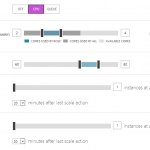
Web Roles CPU autoscaling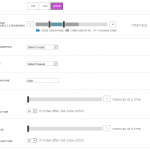
Web Roles queue autoscaling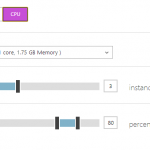
Web Sites CPU autoscaling - You can scale out to a very large number of instances for extremely high load web sites (I know of a situation where at least 250 instances were used). Web Sites
(at least at the moment, and with the default configuration when you first get it - it’s potentially possible to increase this) seems to have a maximum of three instanceshas a maximum of 6 shared or 10reservedstandard instances. Furthermore, as per above screen shot and at least for the moment,Web Sites doesn’t have Extra Small (great for cost effective hosting of low load web sites - but the free and shared instances make up for this) or A4 (Extra Large) / A5 / A6 / A7 / A8 / A9 / D-series / G-series (if you need extreme vertical scale - but you probably only need this for intense Worker Role processing rather than for web sites [unless you are doing something very wrong/weird with your web application :P]).At the moment you can only have SSL connections to your custom domain name by using Web Roles since there is no ability to upload Security Certificates to your Web Site instances, but this will probably be added soon. There is SSL for the azurewebsites.net domain name that you get though.edit: SSL for custom domain names in Azure Web Sites has been released, but it comes at a cost, whereas you can install SSL to your Web Role for free.If you want securely managed Security Certificates for any other purpose than SSL e.g. config encryption, authentication, etc. then you will need to use Web Roles (for now at least).edit: you can now use Azure Web Sites for arbitrary certificates.Apparently, during the preview there is a limit of 1GB of space per subscription that can be used with Web Sites and you can have a maximum of 10 web sites. I found this in a Stack Overflow answer from a Microsoft employee working on Azure. Free and paid shared instances have a limit of 1GB of space with free instances having a limit of 10 websites and shared instances having a limit of 100 websites (reservedstandard instances have 10GB of space and a 500 website limit [I wonder if this is an IIS limit otherwise why would it be there since you have a complete VM(s) at your disposal?]). WithAccelerator for Web RolesAzure Web Farm and AzureWebFarm.OctopusDeploy there is no limit on the number of sites, and depending on your role size you can certainly have more than 1 GB of storage (apart from the fact you have have more than one hosted service, each with more than 1 GB of space).- If you want to have any domain name you want to resolve against your web site using a CName without having to specify those domain names explicitly in the management portal then you will need to use Web Roles (see the comments section below for explanation).
You have the option of using VIP swap as a deployment option - this allows you to fully test the deployment you are about to make and then switch between old and new very quickly (and more usefully, vice versa if something goes wrong)(edit: Web Sites now has a staging environment with similar (but more advanced) functionality)- While I think this is very useful in some circumstances, particularly if the act of deploying is accompanied by separate, long-running processes that could go wrong (e.g. complex database changes that are triggered before the vip swap) I think in general if you can simplify your deployment process such that it’s not required (and simply make it really quick and easy to rollback to the last version) then that’s better (Web Sites enables this due to it’s out-of-the-box deployment options)
- Affinity groups to allow you to ensure that Web Roles are close to storage accounts and potentially other roles within the datacentre (decreasing latency and increasing performance).
I suspect that Web Sites may well do this behind the scenes for the storage account you associate with the Web Site, but of course you can only do it with that storage account and not with multiple ones or other sites / roles- You can create linked resources, which may (I can’t verify or find any information to back this up) provide the same effect - you can do this for Azure SQL Databases and storage accounts:
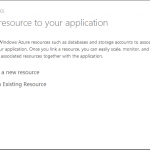
- Explicit upgrade and fault domains
- Web Sites makes upgrade domains redundant given the deployment options (see note above about VIP swap) and I assume that fault domains are likely transparently implemented for you, but that could be wrong
- In-role cache nodes
- The cscfg file and ability to edit in the portal
- You can edit web.config variables and connection strings within the portal for Web Sites so this makes it somewhat redundant
- If you want to use Traffic Manager to distribute your application in multiple data centres across the globe then you can’t use Web Sites, however you can get a similar affect using an Azure Virtual Machine and IIS ARR as per http://stackoverflow.com/questions/13697863/is-it-possible-to-provision-the-same-domain-name-on-multiple-azure-websites
- If you want to use the Content Delivery Network against your web site rather than a static Storage Account then you need a Cloud Service and can’t use Web Sites.
Windows Azure Web Roles has an SLA (99.95%), but Web Sites has no SLA.Web Sites has a 99.9% SLA whereas Web Roles has a 99.95% SLA.- Web Roles can be easily deleted and redeployed from a package in blob storage so if you only need your site functioning for part of the day you could delete the deployment when it’s not needed and have a significant cost saving.
- Web Roles are charged by the minute - I can’t work out if Web Sites are the same or not though, but I assume so since the pricing page talks about converting the usage to Compute hour equivalents.
- Web Roles have 64-bit app pools by default - Web Sites are 32-bit by default and in fact you have to upgrade to standard mode to get a 64-bit app pool; it is possible to downgrade the Web Role app pool to 32-bit
- If you want to use GDI+ or report viewer then that is not currently supported in Web Sites (but does work on Web Roles) - it is in the long term plan to add support and you can keep track of progress via the MSDN forums
- If you want to use DNS lookups in code then that isn’t possible in Azure Web Sites (sorry - I can’t find a link for this one)
The regions that you can deploy Web Sites to are currently restricted while this feature is in preview, but there are probably plans to roll out wider (see point 3 in the link) (edit: it’s available in all regions except South East Asia - I can’t find any reason why it’s not available in that region).
- You can make calls to localhost on the role, which isn’t possible in Azure Web Sites since it doesn’t use a * binding in IIS - instead you have to use the domain name of the site, which will go out through the Azure load balancer
- You can access performance counters


While reading up on this post I found out something about Web Roles that I didn’t know - apparently you can deploy a Web Role package that contains multiple web sites (by specifying their host headers), but it does mean that you have to always deploy all the websites at the same time and keep them all in the same Visual Studio solution.
Updates
Update (10 June 2012)
David Ebbo send me a message via Twitter to let me know the solution he is using to remember his Git password. Also, I found a post that describes how to point to other NuGet feeds than the official one when using package restore.
Update (28 August 2012)
I read a truly excellent post yesterday about Virtual Networks and it made the point that you can’t join a Web Site to a Virtual Network, but of course you can join a VM or Web/Worker Role. Thus I added that as another limitation above.
Update (15 September 2012)
West US Azure data centres now support Web Sites.
Update (18 September 2012)
There were a few big announcements today about Azure Web Sites and I’ve updated this post with some minor corrections accordingly.
Update (9 October 2012)
Added some rather obvious differences I originally missed thanks to the comment below from Roland.
Update (1 January 2013)
Updated to reflect the fact that East Asia is now supported for Azure Web Sites (as per this announcement) and the fact you can now have up to 6 shared and 10 reserved instances rather than the original 3 (as per this announcement).
Update (27 April 2013)
Updated to add the fact that Traffic Manager isn’t supported for Web Sites.
Update (25 May 2013)
Updated to add a note about CDN support as pointed out by Teo below.
Update (17 July 2013)
Overhaul of the post to get it up to date with recent changes to Web Sites and Web Roles as well as a general tidy up and making it more friendly (e.g. added diagram, new intro and tl;dr section and moved around some of the points that were in the wrong section).
Update (8 September 2013)
Added information about GDI+/Report Viewer as pointed out by Travis below.
Update (26 January 2014)
Added information about Web Sites staging environment, Always On Support, DNS lookups, AzureWebFarm.OctopusDeploy and In-role cache and emphasised the 10GB limit for Azure Web Sites.
Update (29 January 2014)
Added note about the web.config options for configuring IIS that are increasingly being opened up for Azure Web Sites.
Update (8 February 2014)
Added notes about A8 and A9 VM sizes, 32-bit vs 64-bit app pools and auto healing.
Update (22 October 2014)
Updated post to reflect the following:
- Out-of-the-box HTTPS with Azure Web Sites
- Azure Web Sites Backup
- Azure Web Sites Processes
- D-series and G-series VMs for Azure Web Roles
- VPN connection to a Virtual Network for Azure Web Sites
- South East Asia available for Azure Web Sites and TFS support is now VSO support with a build as per Josh’s comment
- Can’t make localhost calls on Azure Web Sites
- Site Extensions for Azure Web Sites
- Clarified that you can reserve a static IP for Web Roles for A record support now
- Out-of-the-box Remote Debugging with Azure Web Sites
Update (31 October 2014)
Updated post to mention Hybrid Connections support in Azure Web Sites and the fact that you can use custom certificates in Azure Web Sites now.
Update (6 April 2015)
Added some notes about App Service: Web Apps and added information about the TiP feature.
Update (3 January 2016)
Added note about access to performance counters as pointed out by Matt below.